

 Sprunky
 – Play Original Sprunki Online
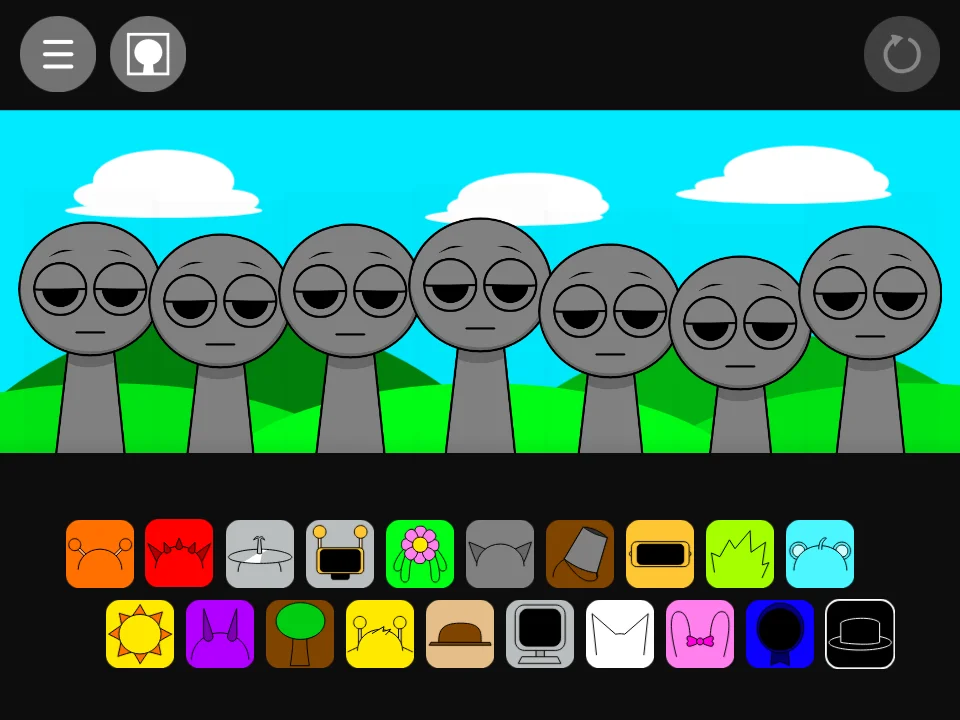
Looking for Sprunky? Play this original-style Sprunki music mixer directly in the game above. Drag a sound icon onto one of the seven gray performers to turn it into a singing character, then add more sounds to build your own loop.
This version starts with a blue sky, green hills and two rows of colorful character icons. There is no score to chase: the music changes with the characters you put on stage. Start with Oren's orange headphones, add a rhythm, then try a voice or melody over the top.
How to Play Sprunky
- Choose a sound. The icons below the stage represent different characters. Drag one onto a gray performer using your mouse, or drag with your finger on a touchscreen.
- Build a mix. Fill another slot to hear its loop alongside the first sound. You can use up to seven performers at once; leaving a slot empty keeps the mix less crowded.
- Change the lineup. Use a performer's controls to remove or mute its part, then try another icon. Oren, Clukr, Vineria, Mr. Sun and Mr. Fun Computer are among the characters included in this build.
- Start again. Use the circular arrow in the game's upper-right corner to clear the lineup. The fullscreen button underneath the game gives you more room to place icons.
The Black Hat and Horror Mode
The black hat is the last icon in the bottom row. Unlike an ordinary sound choice, it switches the cheerful scene to a darker horror presentation, changing the characters and audio. This is part of the game, not a loading error.
The contrast is intentional: this game includes unsettling imagery and sounds. If you only want the bright music-mixing scene, leave the black hat unused.
Sprunky Questions
Is Sprunky the same as Sprunki?
This page uses the search name “Sprunky” for the original-style Sprunki build shown above. It is a character-based music mixer, not a separate platform game. This is a fan-game page, not an official Incredibox release.
Can I play without downloading an app?
Yes. The game runs in your browser for free, without a sign-up. Let the loading bar finish, then interact with the stage to enable sound. The game's files are served from our own game host.
How is this different from Sprunkin?
This build has the familiar hill-and-sky stage and original-style icon artwork. Our Sprunkin game uses redrawn icons and a different background. Both let you arrange characters to mix sounds.